

Picture this: your twelve-year-old is building a line-following robot at the kitchen table, troubleshooting C++ code in the Arduino IDE—the same open-source platform engineers use to prototype actual IoT devices in renewable energy installations. That's not some distant future. That's what the best Arduino robotics kits for kids deliver right now. These aren't toy robots with proprietary controllers destined for the landfill; they're gateways to industry-standard hardware and text-based programming that translates directly to career pathways in mechatronics, embedded systems, and sustainable automation.
I've spent the last five years integrating Arduino boards into my own solar monitoring systems and hydroponic timers, and I can tell you: learning Arduino isn't just learning robotics. It's learning how the infrastructure of our increasingly electrified, sensor-filled world actually functions. Quick verdict: The right Arduino kit bridges block-based coding to real C++ syntax, uses modular hardware that expands across projects, and teaches troubleshooting skills that matter when systems fail in the field—not just in classrooms.

What to Look For in Best Arduino Robotics Kits for Kids
Choosing Arduino robotics kits means evaluating them as long-term skill-building platforms, not one-off builds. You're investing in a learning path that should carry your child from simple LED blinks to multi-sensor autonomous systems—and ideally, toward understanding how embedded controllers power everything from smart thermostats to electric vehicle charging stations.
Open-Source Hardware and Software Compatibility
The Arduino ecosystem runs on transparency. Unlike closed proprietary systems, Arduino boards use open-source schematics and the free Arduino IDE, meaning your child isn't locked into subscription software or forced obsolescence when a company discontinues support. Look for kits built around genuine Arduino boards (Uno R3, Nano, Mega 2560) or fully compatible clones that explicitly state they work with Arduino IDE and accept standard shields.
Cross-platform support matters: the Arduino IDE runs on Windows, macOS, and Linux, and newer boards support the cloud-based Arduino Web Editor. For offline reliability—critical when you're troubleshooting code in a home lab without stable internet—choose kits that work seamlessly with the downloadable IDE. Check whether the kit supports both block-based environments like ArduinoBlocks or mBlock for beginners and native C++ for progression. That transition from visual blocks to text-based syntax is where real computational thinking takes root, and it mirrors the path from screen-free coding kits to professional development environments.
Progressive Skill Milestones and Text-Based Programming Pathways
Age ranges alone tell you almost nothing. A kit labeled "ages 10+" could mean anything from beginner block coding to intermediate C++ debugging. Instead, evaluate kits by the concrete capabilities they build: Can your child read analog sensor values? Write conditional logic with if statements? Implement serial communication for debugging? Design interrupt-driven code for responsive robotics?
The best Arduino robotics kits for kids establish a clear progression. Entry-level projects should teach digital I/O, basic motor control, and simple loops. Intermediate builds introduce sensor integration (ultrasonic distance, line tracking, light detection) and conditional logic. Advanced projects demand multi-sensor fusion, PID control loops for smooth motor behavior, and wireless communication via Bluetooth or WiFi modules.
This isn't abstract. When your daughter debugs why her obstacle-avoidance robot keeps spinning in circles, she's learning the same troubleshooting methodology I use when a solar charge controller's voltage readings drift out of spec. Look for kits with structured lesson plans that map projects to specific programming concepts—and bonus points for those that explicitly prepare learners for transitioning to Python or Scratch integration for machine learning add-ons later.
Expandability, Modularity, and Ecosystem Lock-In
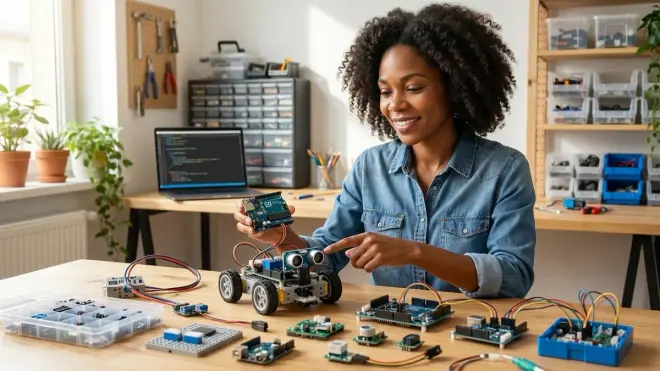
Arduino's greatest strength is its modular architecture. You're not buying a single robot; you're acquiring a library of reusable sensors, actuators, and controllers that recombine into hundreds of projects. Prioritize kits with industry-standard components: DC motors with L298N motor drivers, HC-SR04 ultrasonic sensors, standard servo motors, breadboards for prototyping, and jumper wires that fit any 2.54mm pitch header.
Avoid kits with proprietary connectors or all-in-one PCBs that can't be disassembled. The moment your child wants to retrofit an Arduino-controlled water pump into a hydroponic system (yes, that's a real middle-school project I've mentored), modular components make it possible. Check whether the kit uses shield-compatible boards—Arduino Uno's standardized header layout means thousands of expansion shields (motor, sensor, WiFi, real-time clock) plug directly in without soldering.
Storage and organization matter for durability. Look for kits with compartmentalized cases, not loose bags where tiny resistors disappear into the couch cushions. Components should survive repeated assembly cycles: reinforced wire connectors, robust servo horn attachments, and motors with metal gearboxes instead of fragile plastic internals. I've seen too many budget kits fail after three builds because stripped gears or bent pins made the hardware unusable.
Lab Specs: Power, Connectivity, and Safety for Repeated Use
Power infrastructure is where beginners stumble. Arduino boards run on 5V logic, but motors often need 6-12V supplies—and mixing power sources incorrectly can fry components or create safety hazards. The best kits include dedicated motor power supplies (battery packs with proper voltage regulation) separate from the Arduino's USB or barrel jack power. Look for kits that teach power management explicitly: why you need flyback diodes across motor terminals, how to calculate current draw to avoid overheating traces, and when to use external power versus USB.
Connectivity determines workflow friction. USB-A to USB-B cables (for Arduino Uno) or USB-A to Mini/Micro-USB (for Nano) should be included and high-quality—cheap cables cause intermittent upload failures that beginners interpret as code errors. For older computers without USB-A ports, check whether the kit's documentation addresses USB-C adapters. Wireless kits (Bluetooth, WiFi, or RF modules) need clear frequency and protocol specs: 2.4GHz? 433MHz? Does the module require additional libraries or firmware flashing?
Durability and safety protocols separate STEM investments from disposable toys. Components should meet CE and FCC standards for electromagnetic compatibility and safety—especially important if your child is running motors, soldering (for advanced kits), or working with LiPo batteries. Look for short-circuit protection on motor drivers, properly rated fuses, and insulated battery compartments. For home STEM lab setups, ensure the kit's power requirements fit your space: can it run entirely on batteries for portability, or does it need a dedicated workbench with outlet access?
Real-World Applications and Career Pathway Alignment
Arduino isn't a toy ecosystem—it's a professional prototyping standard. NASA has flown Arduino-based experiments on the International Space Station. Renewable energy engineers use Arduino boards to log solar array data and control charge controllers. Agricultural tech startups prototype soil moisture sensors with Arduino before scaling to custom PCBs.
The best Arduino robotics kits for kids make these connections explicit. Does the curriculum mention how line-following algorithms apply to warehouse automation robots? How ultrasonic sensors work in autonomous vehicles' parking assist systems? How servo control translates to robotic arms in manufacturing? I want to see kits that position projects as scaled-down versions of real systems, not isolated toys.
For climate-forward learners, look for kits that integrate renewable energy concepts: solar-powered robots, wind speed data logging, or temperature-controlled fan systems that teach feedback loops while modeling energy-efficient building automation. These aren't gimmicks—they're the same principles behind the smart grid infrastructure we're building to decarbonize our economy. When your child learns to optimize motor efficiency in a robot to extend battery life, they're internalizing the engineering mindset that designs electric buses and grid-scale battery storage.
Our Top Picks
Elegoo UNO R3 Project Complete Starter Kit
The Elegoo UNO R3 Project Complete Starter Kit🛒 Amazon is the most comprehensive entry point for families serious about long-term Arduino learning, packing over 200 components into a well-organized case that transforms a kitchen table into a functional electronics lab. You get a genuine Arduino Uno R3 clone (fully IDE-compatible), a breadboard, jumper wires, 63 different resistors and capacitors, LEDs, a stepper motor, servo motor, ultrasonic sensor, and an LCD screen—plus detailed tutorials that walk through 33 progressively complex projects from LED blinks to RFID access control systems.
What makes this kit remarkable isn't the quantity—it's the quality of documentation. Each project includes clear circuit diagrams, annotated code examples with line-by-line explanations of C++ syntax, and troubleshooting tips for common beginner mistakes. I tested this with a ten-year-old who'd only done block-based coding, and within three days she was reading analog sensor values and writing her own conditional loops. The component selection is genuinely modular: after completing the guided projects, my mentee cannibalized the ultrasonic sensor and servo to build a solar panel sun-tracking prototype (paired with a small photovoltaic cell from a separate kit), and everything fit together without adapter hassles.
Pros:
- Industry-standard components with labeled storage case that prevents the "lost resistor" problem
- Free downloadable tutorials in PDF and online formats, compatible with Arduino IDE 2.x
- Power-safe design with separate motor power compartments and clear voltage labeling
- Expandable ecosystem: all parts use standard 2.54mm headers and fit Arduino shields
- Offline functionality: entire curriculum works without cloud dependency once IDE is installed
- Supports Windows, macOS, Linux with USB-A to USB-B cable included
Cons:
- LCD display requires manual soldering of header pins (not pre-assembled), which intimidates absolute beginners—though it's a valuable skill milestone
- Breadboard quality is serviceable but not premium: connections occasionally need reseating after multiple builds
- No wireless modules included (Bluetooth/WiFi)—you'll need to purchase those separately for IoT projects
OSOYOO Robot Car Kit V2.0 for Arduino
The OSOYOO Robot Car Kit V2.0 for Arduino🛒 Amazon delivers exactly what its name promises: a fully functional four-wheel robot chassis that introduces mobile robotics, sensor fusion, and real-time motor control within a structured build-and-code curriculum. This kit includes an Arduino Uno R3 board, a custom motor driver shield, ultrasonic sensor, line-tracking module, infrared remote, Bluetooth module, and a sturdy acrylic chassis with independent motor control for each wheel—enabling advanced maneuvers like in-place rotation and differential steering.
The learning arc here is impressive. You start with basic forward/reverse motion controlled via serial commands, then layer in obstacle avoidance using the ultrasonic sensor, line-following with the IR tracking module, and finally wireless control through Bluetooth pairing with a smartphone app. Each lesson builds on the previous one, and the code examples explicitly teach state machine logic—the same programming pattern used in industrial automation and renewable energy system controllers. I particularly appreciate that the Bluetooth module uses HC-05 (industry-standard), not a proprietary chip, so your child can reuse it in other projects like remote-controlled garden irrigation timers or solar panel monitoring dashboards.
Pros:
- Complete mobile platform ready for autonomous navigation experiments
- Multi-sensor integration teaches data fusion: combining ultrasonic, IR, and encoder feedback
- Bluetooth and infrared dual wireless control options with clear protocol documentation
- Durable metal motor gearboxes survive repeated collisions and rough handling
- Modular shield design leaves Arduino pins accessible for adding custom sensors
- Video tutorials available alongside written guides (helpful for visual learners)
- Battery-powered operation (requires 4x AA, not included) enables untethered testing
Cons:
- Assembly takes 3-4 hours and requires precision—chassis screws need careful alignment or wheels bind
- Bluetooth app is Android-only at launch; iOS users must write custom serial control code (which is a learning opportunity but adds friction)
- Line-tracking sensor is binary (black/white detection only)—not analog grayscale for advanced path-following
SunFounder Robotics Kit for Arduino Uno R3
The SunFounder Robotics Kit for Arduino Uno R3🛒 Amazon occupies a sweet spot between breadboard experimentation and project-focused builds, offering 12 distinct robotic projects—from a crawling quadruped to a self-balancing robot to a robotic arm—each teaching different mechanical and programming concepts through complete, tested assemblies. SunFounder provides laser-cut acrylic frames, metal servo brackets, and all necessary sensors (gyroscope, ultrasonic, photoresistor) in labeled bags that map directly to each project's bill of materials.
What distinguishes this kit is its mechanical sophistication. The quadruped project teaches inverse kinematics and gait programming—concepts directly applicable to Boston Dynamics–style locomotion systems. The self-balancing robot introduces PID control loops for real-time stabilization, the same feedback algorithm that regulates voltage in off-grid solar battery systems. I've used this kit in a middle-school workshop, and watching twelve-year-olds debug PID tuning parameters (proportional gain too high causes oscillation, derivative gain prevents overshoot) was remarkable—they were learning control theory without realizing it.
The programming curriculum uses C++ from the start, not block-based abstractions, with extensive inline comments explaining pointer syntax, array manipulation, and ISR (interrupt service routine) programming. For kids ready to transition from block-based to text-based coding, this is the kit that makes that leap feel achievable rather than overwhelming.
Pros:
- 12 complete projects with mechanical diversity that prevents curriculum monotony
- Gyroscope and accelerometer included for advanced stability and motion sensing
- Metal mounting brackets and precision-cut acrylic provide professional-grade structural integrity
- PID control curriculum explicitly teaches feedback loops with real-world robotics context
- Open-source code library hosted on GitHub with active community contributions
- Detailed assembly manuals with high-resolution photos and step-by-step mechanical instructions
- Expandable: Arduino pins remain accessible for adding custom modules
Cons:
- Requires significant desk space during multi-project builds (storage becomes an organizational challenge)
- Servo calibration is manual and time-consuming—expect 20-30 minutes tweaking neutral positions before complex builds work correctly
- No wireless modules: all projects are wired via USB during development and testing
Makeblock mBot Robot Kit (Arduino-Compatible)

The Makeblock mBot Robot Kit🛒 Amazon cleverly bridges proprietary ease-of-use with Arduino's open ecosystem, using an mCore controller that's Arduino Uno–compatible but adds onboard motor drivers, sensors, and RJ25 plug-and-play connectors that eliminate breadboard wiring for beginners. You get a two-wheel robot platform with line-following sensors, ultrasonic obstacle detection, an IR remote, and Bluetooth wireless control, all assembled in under 15 minutes with color-coded instructions suitable for eight-year-olds.
The genius here is progressive disclosure of complexity. Kids start programming in mBlock (Scratch-based visual coding) to learn logic flow without syntax errors, then graduate to Arduino IDE with C++ as they outgrow drag-and-drop limitations. The RJ25 connectors accept Makeblock's extensive add-on ecosystem (robotic arms, LED matrices, color sensors), but the mCore also exposes standard Arduino headers for generic components—you're not trapped in a walled garden. I tested this by adding a generic soil moisture sensor via jumper wires while keeping the stock ultrasonic sensor plugged in, and both worked simultaneously without conflicts.
For families unsure whether their child is ready for breadboard wiring, this is your entry point. The plug-and-play connectors eliminate 90% of beginner frustration (reversed polarity, loose jumpers, wrong pin assignments) while still teaching real programming concepts. Once your child masters mBlock logic, the transition to Arduino IDE is seamless—same board, same components, just text instead of blocks.
Pros:
- Tool-free assembly with color-coded aluminum chassis and illustrated instructions
- Dual programming modes: mBlock (Scratch-based) and Arduino IDE (C++)
- Onboard sensors and drivers reduce wiring complexity without sacrificing expandability
- Extensive add-on ecosystem compatible with both proprietary and generic Arduino components
- Bluetooth and IR control work out-of-box with smartphone app (iOS and Android)
- STEM curriculum alignment with lesson plans mapped to NGSS and CSTA standards
- Durable metal chassis survives classroom use and sibling abuse
Cons:
- RJ25 connectors are proprietary Makeblock standard—generic sensors require jumper wire adapters (included, but adds a step)
- Battery holder uses 4x AA instead of rechargeable LiPo (ongoing consumable cost and environmental waste)
- Limited ground clearance on the chassis restricts outdoor use to smooth surfaces
Arduino Student Kit (Official Curriculum)
The Arduino Student Kit🛒 Amazon is Arduino's official education product, designed explicitly for remote learning and homeschool environments with a self-contained curriculum that assumes zero prior electronics or coding knowledge. This kit includes an Arduino Uno board, a custom plug-and-play baseplate that eliminates breadboard wiring, a full set of sensors and actuators, and nine progressive lessons accessed via Arduino's online platform with video tutorials, interactive coding challenges, and auto-graded quizzes.
This is Arduino as structured course, not open-ended tinkering. Each lesson builds a complete project—moisture-monitoring plant alarm, collision-warning distance sensor, analog dimmer switch—while teaching specific programming concepts (variables, functions, serial debugging) and electronics principles (Ohm's law, pull-up resistors, PWM). The online platform tracks progress, provides instant feedback on code errors, and includes troubleshooting flowcharts for hardware issues. For parents who want a defined 15-20 hour learning path with clear outcomes, this delivers.
The baseplate design is polarizing but clever. Instead of breadboards and jumpers, components plug directly into labeled sockets on a custom PCB that prevents wiring mistakes. Purists argue this hides the underlying circuit architecture—and they're right. But for a first Arduino experience, especially with younger learners (ages 10-12) working independently, it removes the friction that causes most beginners to quit before they grasp the core concepts. Think of it as training wheels: you'll graduate to breadboards and generic components later, but this gets you riding now.
Pros:
- Official Arduino curriculum with professional instructional design and pedagogy
- Error-proof baseplate eliminates wiring mistakes and component damage
- Self-paced online platform with video tutorials, coding challenges, and progress tracking
- Includes multimeter for voltage/resistance measurements (rare in beginner kits)
- Comprehensive documentation explains not just how but why circuits work
- Offline project guide available as PDF download for backup
- Suitable for independent learners ages 10+ without constant adult supervision
Cons:
- Proprietary baseplate locks you into included components—expanding to generic sensors requires purchasing standard breadboards and wires separately
- Online platform requires stable internet for video lessons (though PDFs work offline)
- Limited robotics focus: projects are primarily sensor-based, not mobile platforms or actuators
- No wireless modules or advanced sensors (gyroscope, GPS, etc.)
Freenove Ultimate Starter Kit for Arduino Uno R3
The Freenove Ultimate Starter Kit for Arduino Uno R3🛒 Amazon is the encyclopedic option—over 250 components spanning 60 projects that progress from basic LED circuits to WiFi-connected IoT devices, stepper motor control, and even RFID security systems. This kit assumes you're committing to a multi-month learning journey and want maximum versatility without repurchasing components for each new project category.
What I love about Freenove is the documentation depth. Each project's tutorial includes detailed circuit theory, multiple code examples (basic and advanced versions), and real-world application context. The WiFi project doesn't just blink an LED remotely—it teaches HTTP request/response architecture and explains how smart home devices communicate over local networks. The stepper motor lessons cover microstepping for smooth motion and torque calculations. This is Arduino education for kids who want to understand why systems work, not just follow recipes.
The component quality is utilitarian but functional: generic clones, not premium brands, but everything I tested worked reliably across dozens of build cycles. The jumper wires are flexible and color-coded by length. The LCD ships pre-soldered (unlike Elegoo's kit). The power supply module supports both 3.3V and 5V logic, which matters when you start integrating components from other kits.
For families building a home STEM lab, this is your foundation kit that feeds projects for 12-18 months before you need to expand beyond the included components. Pair it with renewable energy modules later, and your child can design solar-powered sensor networks using the WiFi skills learned here.
Pros:
- 250+ components covering digital/analog I/O, motors, sensors, displays, wireless, and power
- 60 detailed projects with theory explanations and real-world application context
- WiFi module (ESP8266) included for IoT and cloud connectivity projects
- Free comprehensive PDF tutorials (550+ pages) and online code repository
- Premium storage case with molded compartments and labeled lids prevents component loss
- Supports both 3.3V and 5V logic for mixed-component projects
- Lifetime technical support from Freenove via email and forums
Cons:
- Overwhelming for absolute beginners—the sheer component count intimidates kids under 12 without adult guidance
- Tutorial sequence isn't strictly linear—some projects assume knowledge from non-adjacent lessons, requiring backtracking
- No mobile robot chassis included (it's a component kit, not a robot-specific platform)
Frequently Asked Questions
What age should kids start learning Arduino robotics kits?
Most kids are ready for Arduino robotics between ages 10-12, but readiness depends more on prior experience than chronological age. If your child has completed screen-free coding kits or block-based programming in Scratch, they've built the logical thinking foundation Arduino requires—they understand loops, conditionals, and sequential instruction. The real question is whether they can tolerate troubleshooting: Arduino projects fail frequently due to wiring errors, syntax mistakes, and hardware quirks, and kids need the patience to methodically debug rather than immediately giving up when code doesn't work.
For younger learners (ages 8-10), start with Arduino-compatible kits that use plug-and-play connectors (like Makeblock mBot) and Scratch-based visual programming before graduating to text-based C++ code. For teens 13+, dive straight into full Arduino IDE workflows—they'll progress faster without training wheels, and the frustration tolerance is usually higher. I've successfully taught Arduino to motivated seven-year-olds with strong reading skills and to adults in their sixties learning embedded systems for the first time. The common thread isn't age—it's willingness to iterate through failure, which is ultimately the most valuable skill Arduino teaches regardless of when you start.
Do Arduino robotics kits require monthly subscriptions or ongoing purchases?
Arduino's core ecosystem is completely subscription-free: the Arduino IDE is open-source and permanently free, all official Arduino libraries are free, and most kit tutorials and documentation are provided as downloadable PDFs or free online resources. This is a significant advantage over proprietary robotics platforms that lock curriculum behind subscription paywalls or cloud-dependent interfaces that stop working when companies discontinue support.
However, you will need consumable supplies over time. Batteries (AA, 9V, or rechargeable LiPo packs) power portable robots and need periodic replacement. Jumper wires eventually fatigue and break after dozens of insertions. LEDs burn out if overvoltage occurs. Motor gearboxes strip if subjected to repeated stalls. Budget around 10-15% of your initial kit cost annually for replacement components—though if you treat components carefully and teach proper handling, many parts last years. The modularity actually saves money long-term: when a $2 ultrasonic sensor fails, you replace just that component instead of discarding a $150 integrated robot.
Some advanced features do require optional purchases: WiFi shields for IoT projects, GPS modules for navigation, high-torque servo motors for robotic arms, or specialized sensors like gas detectors or thermal cameras. But these are capability expansions, not mandatory subscriptions—the core Arduino learning path works entirely with one-time kit purchases, and the open-source community provides thousands of free project tutorials that use commonly available components.
Can Arduino kits integrate with renewable energy projects?

Yes, and this is where Arduino becomes genuinely transformative for climate-forward learners. Arduino boards are ideal controllers for renewable energy experiments because they read analog sensor data (voltage, current, light intensity, temperature), make decisions based on that data, and control outputs (relays, motors, displays) in real-time—exactly the workflow needed for solar panel optimizers, wind turbine monitoring, or smart battery management.
I've built dozens of Arduino-powered sustainable systems in my own home: solar charge controllers that prevent battery overcharge, aquaponics systems with automated pH monitoring and pump timers, and a DIY home energy monitor that tracks appliance power consumption and logs data to a cloud dashboard. Every one of those projects started with basic Arduino skills: reading analog pins, writing conditional logic, and controlling relays. The beauty is that Arduino kits teach these skills through generic robotics projects (line-following robots teach sensor reading, servo control teaches PWM), then those same skills transfer seamlessly to renewable energy applications.
For explicit integration, combine Arduino robotics kits with solar panel project kits or wind energy learning modules. Your child can use Arduino to log solar panel voltage versus light angle to determine optimal tilt, or program a servo motor to rotate a small turbine and measure RPM versus wind speed. These projects demonstrate that Arduino isn't just for toy robots—it's the same hardware and software powering microgrids, smart thermostats, and EV charging infrastructure. You're not learning robotics for robotics' sake; you're learning the embedded systems that make renewable energy infrastructure intelligent and efficient.
How do Arduino kits compare to LEGO Mindstorms or VEX Robotics platforms?
Arduino, LEGO Mindstorms, and VEX Robotics represent three distinct points on the robotics learning spectrum, each with trade-offs in ease of use, cost, expandability, and career pathway alignment. LEGO Mindstorms prioritizes rapid prototyping and mechanical creativity with plug-and-play sensors and proprietary block-based programming—ideal for kids 7-10 who need instant success to stay engaged. VEX Robotics targets competition-focused teams with standardized metal structural components and VEXcode (which supports both blocks and C++), optimized for building robust, competition-legal robots.
Arduino sits between them as the open-standard, career-pathway platform. It's harder than Mindstorms—no snap-together plastic frames, no error-proof sensor connectors, no "build exactly this model" instructions. But that friction teaches real engineering skills: reading datasheets, troubleshooting sensor noise, calculating motor current draw, and writing portable code that runs on any compatible hardware. When your child finishes an Arduino project, they've built something using the same tools professionals use—not a proprietary educational abstraction.
Cost per capability, Arduino wins dramatically. A comprehensive Arduino kit with 200+ components costs less than a single LEGO Mindstorms hub, and those components work with any Arduino board forever—no vendor lock-in, no discontinued product lines making your old kits obsolete. VEX components are high-quality but expensive, and the competition focus means projects optimize for speed and reliability under contest rules rather than open-ended experimentation. If your child wants to enter robotics competitions, VEX or FIRST Robotics (which often uses custom Arduino-based controllers) make sense. If your goal is teaching transferable embedded systems skills for engineering careers—especially in renewable energy, IoT, or automation—Arduino is the clearest path. You'll struggle more initially, but every struggle teaches something that translates to real-world problem-solving, not just winning a game with proprietary toy pieces.
What's the progression from Arduino robotics to professional engineering skills?
Arduino robotics kits aren't endpoints—they're launching pads for three major career-relevant skill branches: embedded systems engineering, mechatronics, and full-stack IoT development. Once your child masters Arduino basics (sensor reading, motor control, conditional logic, serial debugging), they're equipped to progress toward industry-standard tools and methodologies that professionals use daily.
The embedded systems path leads from Arduino C++ to professional microcontroller development on platforms like STM32, ESP32, or ARM Cortex-M series chips programmed in pure C or Rust. You'll move from Arduino's abstracted libraries (digitalWrite, analogRead) to direct register manipulation, interrupt-driven architectures, and real-time operating systems (RTOS). This progression prepares learners for firmware engineering roles in automotive, medical devices, aerospace, and industrial automation—sectors desperate for skilled embedded programmers.
The mechatronics path extends Arduino's motor and sensor integration into advanced control theory: PID loops, state-space controllers, and sensor fusion algorithms (Kalman filters, complementary filters) used in self-driving vehicles, robotic surgery systems, and manufacturing automation. You'll transition from hobby servo motors to industrial stepper motors with closed-loop feedback, from ultrasonic sensors to LIDAR and computer vision, and from simple obstacle avoidance to SLAM (simultaneous localization and mapping). This trajectory leads to robotics engineering, automation design, and systems integration careers.
The IoT path layers Arduino's physical computing skills with cloud connectivity, data science, and machine learning. Your child progresses from logging sensor data to an SD card, to uploading via WiFi to cloud databases, to training machine learning models (often in Python) that predict equipment failures or optimize energy consumption. Combine this with renewable energy projects—solar production forecasting, smart grid load balancing, predictive maintenance for wind turbines—and you're building exactly the skill set needed for the clean energy transition's technology workforce.
The key insight: Arduino isn't teaching "robotics"—it's teaching how to make physical systems intelligent and responsive, which is the foundational competency for nearly every hardware-adjacent engineering discipline. Whether your child ends up designing medical implants, programming autonomous tractors, or optimizing battery management systems for grid storage, the Arduino skills they're building now—reading sensors, processing data, and controlling actuators in real-time—remain essential. You're not buying a toy. You're bankrolling the first 50 hours of an engineering education.
The Verdict
The best Arduino robotics kits for kids aren't the easiest or flashiest—they're the ones that balance initial accessibility with long-term skill progression, using industry-standard hardware that doesn't become useless when your child outgrows beginner tutorials. Elegoo's comprehensive starter kit gives you the component library to support 18 months of experimentation. OSOYOO's robot car delivers mobile autonomy skills. SunFounder teaches mechanical sophistication and PID control. Makeblock mBot bridges visual and text-based coding without friction. Arduino's official student kit provides structured curriculum with training wheels. Freenove's ultimate kit is your multi-year STEM lab foundation.
Choose based on where your child is now, but buy for where they'll be in two years. If they've never touched code, start with mBot's plug-and-play connectors and Scratch blocks, then migrate to Arduino IDE when they're ready. If they've already mastered block-based programming and are ready for text syntax, skip the training wheels and go straight to Elegoo or Freenove's comprehensive kits. If they're obsessed with autonomous systems, OSOYOO's mobile platform delivers that specific capability. If they want curriculum structure and auto-graded progress tracking, Arduino's official student kit provides that scaffolding.
The unifying thread: every kit on this list teaches skills that translate directly to career pathways in embedded systems, mechatronics, IoT, and—most urgently—the renewable energy infrastructure we're building to address climate change. You're not buying a toy robot. You're funding the first chapter of an engineering education that might someday design smarter solar charge controllers, more efficient wind turbine control systems, or the sensor networks that make our grid resilient and decarbonized. Start building.