

If you're wondering whether to commit a full room to STEM learning or fold it into an existing space, the answer depends less on square footage and more on your child's developmental stage and your family's learning rhythm. A dedicated STEM room vs multi-purpose space decision shapes how your child engages with hands-on learning—and whether they'll return to projects independently or need you to set up and pack away every session. This article walks you through the developmental, practical, and financial trade-offs so you can choose the setup that actually gets used.
Quick Comparison
| Criterion | Dedicated STEM Room | Multi-Purpose Learning Space |
|---|---|---|
| Setup Time | Always ready; projects stay assembled | 5-15 minutes per session to clear/restore |
| Developmental Fit | Best for ages 8+ with sustained project focus | Ideal for ages 3-7 with shorter attention spans |
| Space Requirements | 80-120 sq ft minimum; dedicated power circuits | Dining table, kitchen counter, or shared desk |
| Budget Impact | $800-2500 initial setup (furniture, storage, power) | $150-500 (portable storage, extension cords) |
| Progressive Learning | Supports multi-week builds and Arduino/Python progression | Works well for screen-free coding and modular kits |
Space Permanence and Learning Continuity
The biggest difference between a dedicated STEM room and a multi-purpose space isn't the size—it's whether your child can pause mid-project without dismantling their work. When my daughter was seven, she built a LEGO BOOST Creative Toolbox🛒 Amazon robot over three evenings. We were using the dining table. Each night, she had to photograph her progress, disassemble enough to clear space for dinner, and reconstruct the next day. By session three, she'd lost interest. Not because the kit was too hard, but because the friction of starting over drained her momentum.

Dedicated rooms eliminate setup friction. Projects stay assembled. A Makeblock mBot Ranger Robot Kit🛒 Amazon can sit half-programmed on a workbench while your child moves to a 3D printing project the next afternoon. This permanence matters most for children ages 8-12 who are transitioning from single-session activities to multi-day engineering challenges. If your child is working through Arduino-based robotics kits or building iterative designs in Tinkercad, a dedicated space lets them think in project arcs rather than isolated sessions.
Multi-purpose spaces work beautifully for younger learners (ages 3-7) whose projects naturally conclude in one sitting. Screen-free coding boards, simple circuit kits, and tactile logic games don't require overnight storage. Your four-year-old completes a Cubetto Playset🛒 Amazon coding sequence, you return the pieces to their bin, and the kitchen table becomes dinner space again. No developmental momentum is lost because the activity reached a natural stopping point. For families exploring screen-free coding kits, a shared table often provides better supervision opportunities than an isolated room.
The trade-off is consistency. If your child needs to see a project to remember it exists, multi-purpose spaces demand more parental cuing. You become the memory keeper, the one who says, "Remember your solar panel experiment? Let's pull that out again." Dedicated rooms hand that responsibility to the child. The visible project becomes its own prompt.
Lab Specs: Power, Storage, and Workflow Requirements

A dedicated STEM room requires infrastructure investment that goes beyond square footage. You'll need at least one 15-amp dedicated circuit if you're running a 3D printer, soldering station, or multiple devices simultaneously. Many families underestimate this. A standard 15-amp circuit can handle about 1,800 watts; a beginner FDM 3D printer draws 100-200 watts during printing, but if you add a laptop, LED desk lamp, and a hot glue gun, you're approaching capacity. For homes with older wiring, you may need an electrician to install a separate breaker—budget $300-800 for this upgrade.
Storage density matters more than storage volume. Dedicated rooms benefit from wall-mounted pegboards, labeled clear bins (6-12 quart capacity for component sorting), and tiered shelving that keeps frequently used items at eye level. You want your child to retrieve a specific sensor, resistor pack, or 3D filament spool without digging through a catch-all drawer. This isn't about neatness—it's about cognitive load. When a 10-year-old can grab the exact part they need in under 15 seconds, they stay in problem-solving mode rather than scavenger-hunt mode.
Multi-purpose spaces require portable, modular storage. Rolling carts (30-40 quart capacity) work well for families who move STEM materials between rooms. Look for units with locking casters and multiple drawer heights—shallow drawers for circuit components, deeper ones for robotics kits or larger manipulatives. The Home STEM Lab Setup Checklist covers specific storage specs, but the core principle is this: if setup takes longer than five minutes, younger children will disengage before you've finished unpacking.
Connectivity and ventilation are non-negotiable for both setups. If your child is using Arduino IDE or Python-based robotics, you need reliable Wi-Fi or Ethernet for software updates and library downloads. Some kits (like certain VEX Robotics controllers) require cloud accounts for firmware updates. For 3D printing or soldering, you need either a window that opens fully or a small exhaust fan—PLA filament isn't toxic, but the ultrafine particles from prolonged printing sessions deserve ventilation. Multi-purpose spaces have an advantage here: kitchens and dining areas typically have better airflow than spare bedrooms or basements.
Age-Appropriate Skill Outcomes and Space Matching
Your child's developmental stage determines which setup actually supports learning rather than just housing equipment. Ages 3-5 thrive in multi-purpose spaces where you're nearby. They're building foundational spatial reasoning and sequential thinking—skills that emerge through short, guided sessions with manipulatives like screen-free coding robots or simple gear sets. At this stage, the "lab" is less important than your proximity. You're narrating their actions, asking gentle questions ("What happens if you turn that piece?"), and co-regulating frustration when a tower falls or a sequence doesn't run as expected.
Ages 6-8 represent a transition zone. Many children this age benefit from a hybrid approach: a small, defined STEM corner within a shared room. This might be a 4-foot folding table in the family room or a dedicated shelf in the playroom. The key is visual boundaries—the child knows this space is for building, coding, or experimenting, even if it's not a separate room. This age group is developing sustained attention (15-30 minutes on a single task) and trial-and-error persistence. They need enough space to spread out a LEGO WeDo 2.0 or unplugged coding game, but they're not yet managing multi-session projects independently.
Ages 9-13 gain the most from dedicated spaces. This is when children begin abstract planning, iterative debugging, and self-directed problem-solving—the cognitive skills that underpin real engineering work. They're ready for progressive STEM learning paths that span weeks: building a robot, writing Python scripts to control it, troubleshooting sensor drift, redesigning the chassis. A dedicated room lets them leave breadcrumbs—notes on a whiteboard, half-assembled circuits, printed test pieces—that their brains use as external memory. This matters because adolescent executive function is still maturing. The environment becomes a scaffold for their thinking.
Does this mean younger children can't use dedicated spaces or older ones can't learn at the kitchen table? Absolutely not. But matching space type to developmental capacity reduces friction. A five-year-old in a dedicated STEM room will mostly play in whatever room you're in. A twelve-year-old forced to pack away a Raspberry Pi project every night will eventually stop starting complex builds.
Cost Realities: Initial Investment vs Long-Term Flexibility
A dedicated STEM room costs more upfront but can reduce per-project expenses over time. Initial setup—workbench or desk ($150-400), adjustable chair ($100-250), pegboard and storage bins ($80-200), power strip with surge protection ($30-60), task lighting ($40-100)—typically runs $800-1,500 before you buy a single kit. If you're adding electrical work or dedicated ventilation, add another $500-1,000. For families investing in equipment like a 3D printer or oscilloscope, the dedicated space becomes a sunk cost that spreads across years of use.
Multi-purpose spaces keep initial costs under $500. You'll spend $100-200 on rolling storage, $50-80 on a folding table or lap desk, and $150-200 on basic supplies (breadboards, jumper wires, basic tool set). The flexibility is appealing: if your child's interests shift from robotics to chemistry to art, the space adapts without renovation. You're not locked into a room that feels like a failed investment if STEM learning doesn't stick.
The hidden cost of multi-purpose setups is time—yours and your child's. Five minutes of setup twice a week adds up to 8-9 hours per year. That's time not spent building or coding. For families with multiple children or packed schedules, that friction compounds. One parent I worked with calculated she spent 40 minutes per week managing STEM materials in a shared space. She converted a walk-in closet to a micro-lab. Her son's project completion rate tripled in two months—not because he was more capable, but because he stopped avoiding the hassle of asking her to set things up.
Consumables and subscriptions affect both setups equally. Whether you have a dedicated room or a kitchen table corner, 3D printer filament ($20-30 per kilogram), replacement batteries, craft supplies, and software subscriptions (Tinkercad is free; Fusion 360 offers free student licenses) add $15-50 per month to your STEM budget. The space doesn't change these costs—but a dedicated room might encourage more frequent, deeper use, which increases consumable burn rate. That's actually a good problem. It means your child is actively building skills rather than letting kits collect dust.
How Each Setup Supports Progressive Learning Paths
Dedicated spaces enable visible learning progression. When your child can see their Makeblock mBot Neo from last year sitting next to their current Arduino-based rover project, they internalize growth. This isn't sentimental—it's metacognitive. They can physically compare their past work to current capabilities, which builds self-efficacy (the belief that effort leads to improvement). For children working through screen-free coding to text-based programming transitions, having both stages visible in the same space helps them recognize that Python isn't harder—it's the next step.
You can also stage progression spatially. One shelf holds foundational tools (screen-free coding boards, basic circuits). The middle shelf displays current projects (robotics kit in progress, half-finished 3D print). The top shelf archives completed builds and showcases milestones. This physical learning path mirrors the cognitive one. When your 11-year-old reaches for the Arduino starter kit, they're not guessing whether they're ready—they can see they've mastered the prerequisites on the lower shelf.
Multi-purpose spaces require external documentation to track progression. A project binder, photo log, or digital portfolio becomes essential. Your child photographs completed builds, writes brief reflections, and dates each entry. This works well for children who enjoy journaling or storytelling, but it's an additional cognitive task—and one more thing to manage. For families already using progressive learning path checklists, this integration feels natural. For others, it's another item on the parental to-do list.
Both setups can support skill sequencing if you're intentional. The difference is whether the environment itself reinforces the sequence (dedicated room) or whether you rely on memory and planning tools (multi-purpose). Neither is inherently better—it's a question of where you want to allocate mental energy. Some parents find it easier to manage documentation than to maintain a separate room. Others would rather invest in infrastructure once than track progression manually for years.
Who Should Choose a Dedicated STEM Room
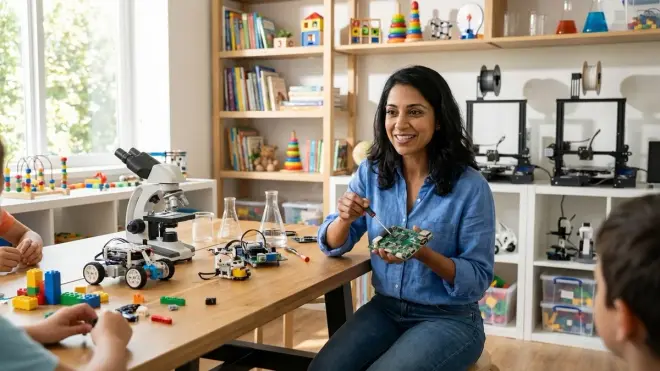
You'll benefit most from a dedicated STEM room if:
- Your child is age 8 or older and engages in projects that span multiple days or weeks
- You have a spare bedroom, large closet (60+ sq ft), basement corner, or garage space that's climate-controlled
- Your budget allows for $800-2,500 in initial setup costs (furniture, electrical, storage)
- Your child is transitioning to Arduino-based programming, 3D printing, or robotics competitions that require iterative builds
- You value having projects remain visible and accessible without daily setup/teardown
This setup works particularly well for households with multiple STEM-engaged children, where equipment and space get consistent use. It's also ideal if your child is working toward specific capability milestones—like preparing a science fair project, building competition robots, or developing a portfolio for pre-engineering programs.
Who Should Choose a Multi-Purpose Learning Space
A multi-purpose space makes more sense if:
- Your child is ages 3-7 and completes most STEM activities in single sessions
- You live in an apartment or home where square footage is limited
- You want to keep STEM learning integrated into family spaces for easier supervision
- Your budget prioritizes spending on kits and materials rather than infrastructure
- Your child's interests shift frequently, and you value flexibility over specialization
Multi-purpose setups also excel for families just beginning their STEM journey. You can test engagement levels, identify what holds your child's attention, and scale up to a dedicated room later if needed. Starting small isn't settling—it's smart risk management. Many families who eventually create dedicated labs tell me they're glad they didn't invest heavily before understanding their child's learning style and interest staying power.
Frequently Asked Questions
Can you create a functional STEM learning space in a small apartment?
Yes—focus on vertical storage and collapsible work surfaces to maximize limited square footage. Wall-mounted pegboards hold tools and supplies without consuming floor space, while folding tables (24-36 inches wide) provide work surfaces that stow away when not in use. Rolling carts with three to five tiers can hold age-appropriate kits, electronics components, and art supplies in a 2x2 foot footprint, then slide into a closet or under a bed between sessions. Prioritize multi-use items: a sturdy lap desk serves as both a work surface and portable storage lid, and stackable translucent bins let you see contents without unpacking everything. The key is making setup genuinely quick (under three minutes) so neither you nor your child avoids starting projects due to hassle.
How do you prevent a dedicated STEM room from becoming a cluttered storage space?
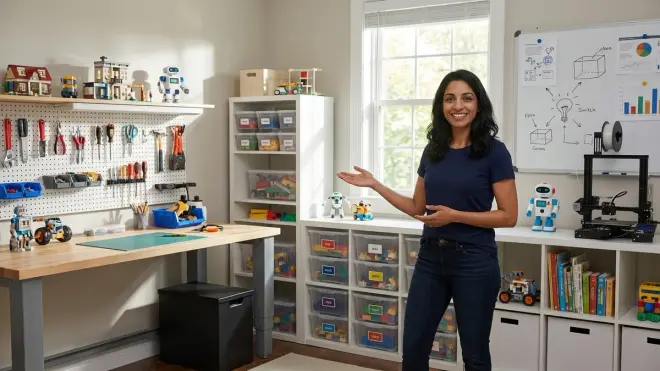
Implement a one-in, one-out rule for kits and materials, and conduct quarterly audits where you and your child evaluate which items still match their current skill level and interests. Archive completed projects with photos rather than storing every physical build indefinitely—this honors your child's work without sacrificing usable space. Designate specific zones for different activities (robotics workbench, 3D printing station, electronics components area) with clear boundaries, so materials don't migrate randomly. Label everything, including empty spaces on shelves, to create visual accountability. Most importantly, involve your child in organization decisions starting around age 7; when they design the system, they're more likely to maintain it. If the room still becomes overwhelming, that's data—it may signal you've accumulated more materials than your child's developmental stage can meaningfully use.
What's the minimum space needed for a dedicated STEM room to be worthwhile?
You can create a functional dedicated STEM space in as little as 60-80 square feet—roughly the size of a walk-in closet or a 6x10 foot area. What matters more than total square footage is having enough room for a 4-foot work surface, a chair with clearance to push back, and vertical storage that keeps materials visible and accessible. A converted closet can house a wall-mounted fold-down desk, pegboard on three walls, and overhead shelving for rarely used equipment. Corner spaces in basements or bonus rooms work well because you can use two walls for storage and one for the workspace. The space becomes "worthwhile" when it saves you more than 10 minutes per week in setup time and allows your child to pause projects mid-session without disrupting household function—that threshold usually happens around 60 square feet with thoughtful design.
Bottom Line
The dedicated STEM room vs multi-purpose space decision isn't about which setup is objectively better—it's about which matches your child's developmental stage, your family's rhythm, and your home's physical realities. Younger children (ages 3-7) working through foundational screen-free coding skills often thrive in supervised, shared spaces where you're naturally nearby. Older learners (ages 8-13) tackling multi-session projects benefit enormously from dedicated rooms that eliminate setup friction and keep complex builds visible. Both approaches can support meaningful progressive learning paths if you're intentional about storage, access, and making projects feel low-barrier to start.
Start where you are. If that's a kitchen table corner, invest in portable storage and commit to guilt-free five-minute setups. If you have a spare room, treat it as learning infrastructure—not a playroom that happens to have science kits. Your child's engagement will tell you if and when it's time to adjust. The goal isn't a magazine-perfect lab. It's a space—whether dedicated or shared—that gets used, challenges your child, and grows alongside their capabilities.